
To continue to improve service for clients who use transit in the city. The goal is to optimize resources in a way that will benefit clients.
Interior Page - No Banner
Consult the frequently asked questions below to find out everything about on-demand transit.
Why has the City of Dieppe chosen to offer on-demand transit?
When is on-demand transit available?
- Monday to Saturday: 6 a.m. to 10:30 p.m.
- Sunday: 9 a.m. to 6:30 p.m.
How do I book a trip over the phone?
Call 506.877.7818. Phone bookings can be made during the following hours:
- Monday to Friday: 8:30 a.m.–10 p.m.
- Saturday: 6:30 a.m.–9:30 p.m.
- Sunday: 10 a.m.–6 p.m.
Where do I direct questions and comments about on-demand transit?
Telephone: 506.877.7900
Email: urban.mobility@dieppe.ca
On-demand transit is transit that is flexible in that it doesn’t follow a set route or schedule. Riders can book a ride over the phone or via the service’s mobile app or website. The system adds the booking to the route of the vehicle in service, taking into account all of the other active bookings.
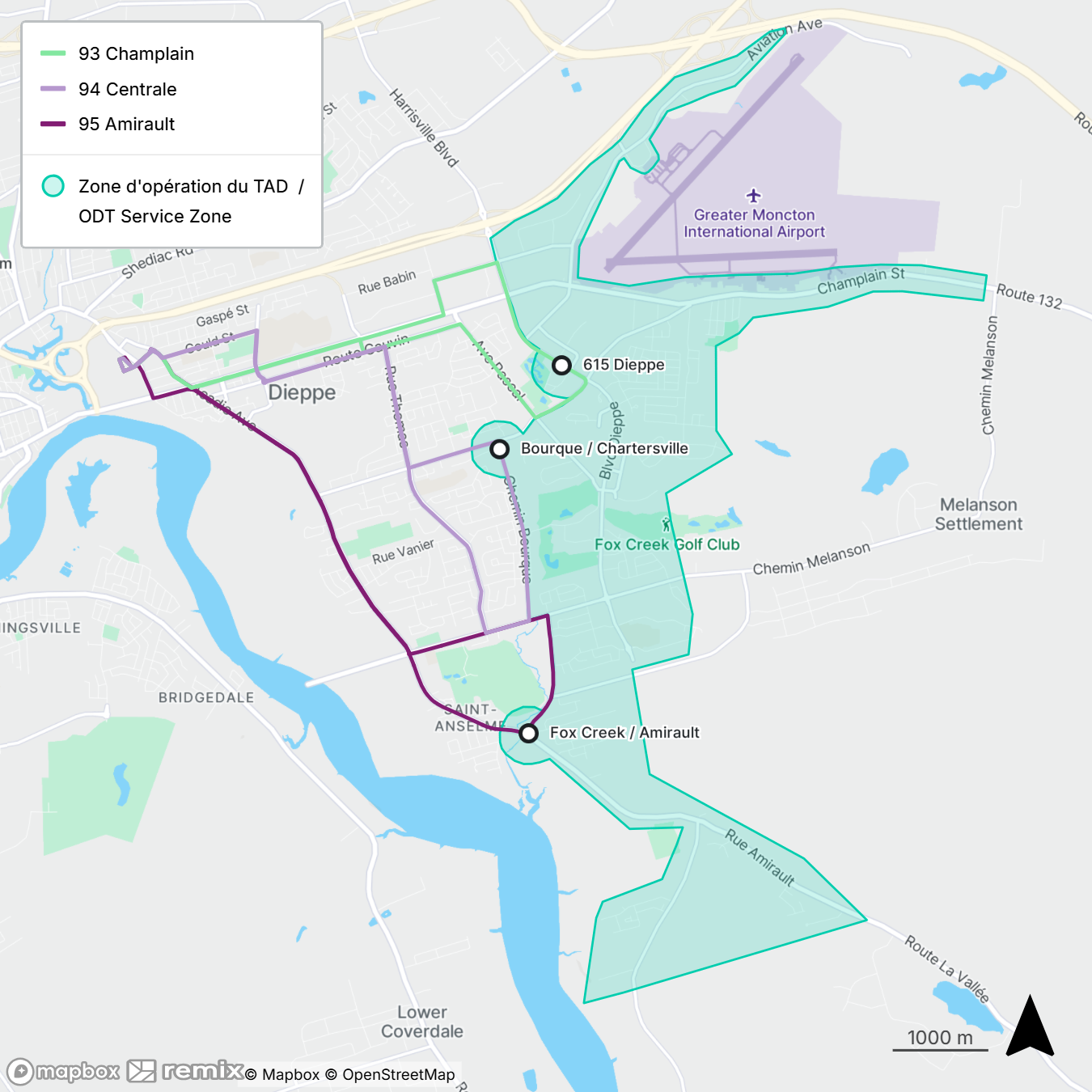
The service provides trips to and from the Codiac Transpo service area via three transfer points.
- Dieppe IGA COOP (615 Dieppe Boulevard)
- Bourque Road at Eunice Avenue
- Amirault Street at Fox Creek Road
What are the advantages on-demand transit?
This new approach offers:
- The addition of new destinations;
- increased service frequency and availability;
- more reliable service;
- reduced operating costs;
- longer service hours;
- greater transit coverage;
- improved access for users who are not within walking distance of Codiac Transpo's fixed routes;
- the addition of a transfer point offering users the possibility of transferring to Codiac Transpo fixed bus routes;
- access to trips with departure and arrival points within the area not served by Codiac Transpo.
What parts of the city does on-demand transit operate in?
The section in turquoise (light blue-green) shows the on-demand transit service area. Travel between the turquoise zone and Codiac Transpo routes are taking place via three transfer points.
Travel solely within the turquoise zone is also permitted.
How much does on-demand transit cost?
The service is currently free for all users. Fees will have to be paid upon embarking the Codiac Transpo bus.
What are the differences between on-demand and regular service?
On-demand service is available by reservation only. It differs from regular transit in that the vehicles don’t follow set routes like Codiac Transpo buses do (i.e., routes 93, 94 and 95). On-demand routes are based on the reservations received.
Riders can therefore use on-demand transit to access one of the three transfer points and then access Codiac Transpo's fixed routes towards their desired destination.
What types of vehicles are used to provide the service?
The service is provided using passenger vans that can accommodate up to five people. All vehicles are marked with the City of Dieppe logo.
How long does it take for a booking to be confirmed?
The system will either confirm or reject the booking within two minutes. You’ll receive your trip details 30 minutes prior to your departure, as the system calculates the most efficient route for all riders.
Where and when should I wait for the vehicle?
You’ll receive a notification through the app 30 minutes before your departure telling you where to go and when to be there. The pick-up stop is usually within 500 metres of your starting point. If you book over the phone, the agent will provide the details to you at the time of booking.
What is the difference between origin, destination, pick-up bus stop, and drop-off bus stop?
- Origin: Your starting point.
- Destination: Where you want to go.
- Pick-up bus stop: Where the system tells you to go to be picked up. The system will choose a stop near your starting point that fits with the bookings already confirmed for other clients. Note that your place of pick-up may change from one day to the next, even if the trip is the same.
- Drop-off bus stop: Where the system chooses to let you off the vehicle. The system will choose a stop near your destination that fits with the bookings already confirmed for other clients. Note that your drop-off point may vary from one day to the next, even if the trip is the same.
Why do I need to enter my starting address if the vehicle doesn’t pick me up there?
The pick-up stop is selected automatically by the system based on your actual starting point. In some cases, your point of origin may be located near several possible stops. The system will choose the most efficient one for the current route.
The system is configured to select a pick-up stop within roughly 500 metres of your point of origin. This is done to maximize efficiency and ensure that you’re picked up as close as possible to your actual starting point.
Why do I need to enter my destination address if the vehicle doesn’t drop me off there?
The drop-off stop is selected automatically by the system based on your final destination. In some cases, your destination may be located near several possible stops. The system will choose the most efficient one for the current route.
The system is configured to select a stop within roughly 500 metres of your destination. This is done to maximize efficiency and ensure that you are dropped off as close as possible to where you want to go.
It’s difficult for me to walk 500 metres because of reduced mobility. What are my options?
If you have reduced mobility and can’t walk 500 metres, select the “has reduced mobility” option in your profile.
The system will then automatically select the stops closest to your point of origin and destination for all your trips. Note that this feature is reserved for people with actual reduced mobility. To avoid overloading the system and reducing the chances of getting a ride at the requested time, please use this feature only if necessary.
Since I have reduced mobility, can I choose my pick-up and drop-off stops to simplify my trips?
You can indicate in your profile that you have reduced mobility. The system will then automatically select the stops closest to your point of origin and destination for all your trips.
This will allow you to choose the stops you wish to use by entering them as points of origin or destinations. All stops display as a bus icon on the mobile app. Please don’t select this option if you don’t need it, as it may make it more difficult for you to book rides during peak periods.
What should I do if I’m going to arrive late for a pick-up?
Drivers will not wait for late riders. If you’re going to be late, it’s best to cancel your trip and book a later time. This will ensure that other riders do not experience unnecessary delays and are not inconvenienced.
What is the difference between leave, arrive, pick-up and drop-off times?
- Leave: The time at which you should start heading to your pick-up stop.
- Arrive: The time at which your trip will end, including walking time between your drop-off point and your final destination.
- Pick-up time: The vehicle boarding time. You need to be at the stop at that time, and we strongly recommend arriving a few minutes in advance.
- Drop-off time: The time scheduled for getting off the vehicle.
What are the differences between the “Leave” and “Arrive” options when entering trip times?
There are two options for choosing your trip time: “Leave” and “Arrive.”
If you choose “Leave,” it means that you want to leave from your starting point at or after the specified time. Use this option if your departure time is important. For example, if you finish work at 6:30 p.m. and want to leave around 6:45 p.m. or later. The “Leave” time is when you should leave your starting point (home, work, business) and head to the stop to be picked up.
If you choose “Arrive,” it means that you want to arrive at your destination at or after the specified time. Use this option if your arrival time is important. For example, if you must be at work before 6:45 p.m. The “Arrive” time is when you want to arrive at your destination (home, work, business), including walking time from the drop-off point.
Does the system automatically search for alternate routes?
Yes, it will search for an alternate ride before rejecting a booking.
If you request a departure time, the system will search for an alternate route up to one hour later than the requested time. If no rides are available, the system will automatically search up to 30 minutes before the requested time. If no options are found, the system will indicate that there are no vehicles available for the requested trip.
If you request an arrival time, the system will search for an alternate route up to one hour earlier than the requested time. If no rides are available, the system will automatically search up to 30 minutes after the requested time. If no options are found, the system will indicate that there are no vehicles available for the requested trip.
You don’t need to try booking multiple times within a few minutes, as the system already does this automatically for you.
The system selects the most efficient pick-up and drop-off stops based on all current bookings. The stops for the same trip may therefore vary from one day to the next. The system selects stops within approximately 500 metres of the starting point and the final destination.
Yes, to maximize the chances that the system will accept your booking preferences. By booking early, you also avoid being stuck with limited or no options during peak periods. Booking early is a good for peace of mind and can be done up to seven days in advance.
Can I book more than one trip in advance?
Yes, you can book all the trips you need for the upcoming week as early as Sunday, which will save you time and avoid the uncertainty of last-minute bookings.
The scheduled end times correspond to the times at which the vehicle has to return to the garage. The system will not accept bookings past this point.
If you need a ride late in the day, book an arrival time that fits the schedule. The system will select a departure time that allows the vehicle to offer you a route within the system’s parameters.
Should I cancel my booking if my plans change?
Yes, to ensure that the service runs efficiently for all users. If you leave your trip active in the system and don’t show up at your stop, the bus will have made an unnecessary trip when it could have served another client.
The system records no-shows, and this they could eventually affect your file. By cancelling your booking, you allow the system to better plan trips and ensure service for everyone.
Why should I arrive at the stop a few minutes early?
To facilitate pick-up. Although the bus won’t leave before the scheduled time, it also won’t wait for late riders so as not to impact the quality of service for other users. By arriving on time, you help create a pleasant and stress-free travel experience for yourself and other riders.
Contact Us
info@dieppe.ca
506.877.7900
Sign up to our Newsletters
Stay up to date on the city's activities, events, programs and operations by subscribing to our Newsletters.